 SocialMarks
Turn your saved posts into a playbook you can ask questions.
Paste your saves from Instagram, TikTok, or X. SocialMarks transcribes the videos, reads the carousels, merges everything into one living guide, and answers your questions — with sources.
The hooks playbook
- Open with the objection — the pattern in six of your saves 7 19 43
- First three words on screen beat the first three seconds of talking 12 28
- Every reel transcribed — the 0:42 breakdown is now written steps
“What hook formulas have I saved?”
Nine fit: the negative-hook opener 43, the silent-demo format 4, and the caption-first pattern 9…
You've saved 400 reels. You've reopened six.
Then it's Monday, you're planning the week's content, and that perfect hook you saved is nowhere.
From saved to answered in four steps
Two taps from the share sheet
Share from Instagram, TikTok, or X on your phone, or paste up to 20 links at once from anywhere.
The whole post, not just the link
SocialMarks watches the video, transcribes the audio, and reads every carousel slide. Each save becomes a card with the steps, numbers, and takeaways written down.
The playbook writes itself
Every save merges into its collection's living guide. Fifty reels become one document — and it rewrites itself with every new save.
Answers from your own saves
Ask the guide a question and get an answer built from what you saved — cited back to the original posts.
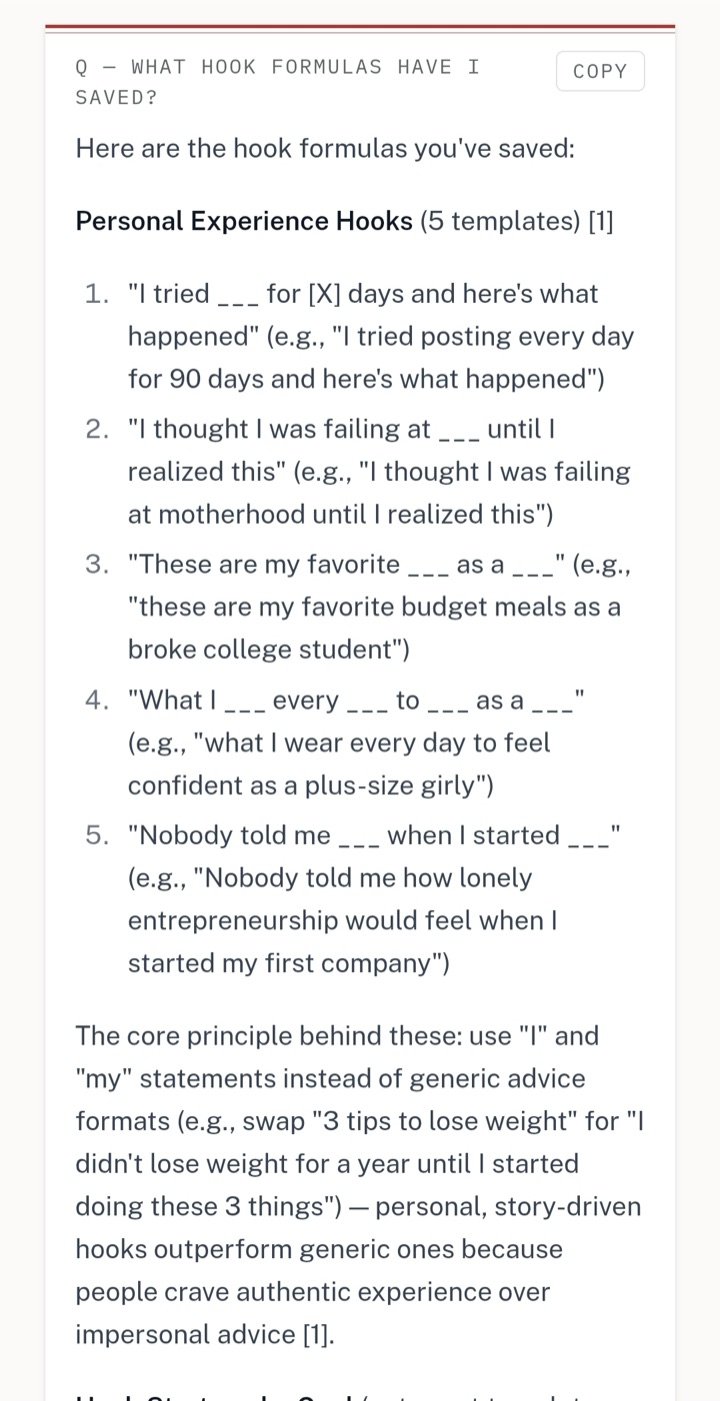
Every answer shows its sources.
This is a real answer from a real library. Five hook templates, assembled from saved reels, each claim cited back to the post it came from. Copy it and go write.
Bookmark tools organize your saves.
SocialMarks answers from them.
Start free. Stay free until it earns its keep.
$0
25 saves, yours forever
- Transcripts and summaries on every save
- A living guide per collection
- Answers with sources
$15/month
or $120/year — two months free
- Unlimited saves
- Everything in Free
- Cancel anytime
$99/year
Locked at $99 for as long as you stay
- Unlimited saves
- Price never rises
- First 100 members only
Common questions
What does SocialMarks do with a saved post?+
You paste a link (or share it from your phone). SocialMarks pulls the full content — video, audio, caption, every carousel slide — distills it into the steps, numbers, and takeaways, and adds it to a collection. Each collection maintains a living guide built from everything inside it.
Which platforms does SocialMarks support?+
Instagram reels, posts, and carousels; TikTok videos and photo posts; and X posts. Paste any post link, or share straight from the app on Android.
Does it work with videos and photo carousels?+
Yes. Videos are transcribed, so a talking-head recipe becomes written steps. Carousel slides are read individually, so a 10-slide workout plan becomes a card you can search and question.
What is a living guide?+
Each collection maintains one document built from every save inside it — a playbook that rewrites itself with every save you add. Fifty saved reels about hooks become one hooks guide, with every claim cited back to the post it came from.
How is SocialMarks different from bookmark managers?+
Bookmark tools sync and organize links. SocialMarks reads what's inside them. Ask "what high-protein dinners have I saved?" and you get an answer assembled from your saves, with citations back to the original posts.
Can I try it without signing up?+
Yes. The free distiller at socialmarks.ai/distill takes one Instagram, TikTok, or X link and returns the written card — summary, takeaways, steps — with no account, three posts per day.
Is there a free plan?+
Yes — 25 saves free, no card required. Distilling, living guides, and Ask are all included. Paid plans remove the save limit: $15/month, $120/year, or $99/year locked forever for the first 100 founding members.
How do I save posts from my phone?+
On Android, install SocialMarks from your browser and it appears in the native share sheet — two taps from Instagram to saved. On iPhone, copy the link and paste it in; you can paste up to 20 links at once.